Ciklusidő és árajánlat másodpercek alatt.Cycle time and quotes in seconds.
A kontúrból vagy a STEP-modellből műveletenkénti időt, PDF-árajánlatot, lejátszható műveleti szimulációt és méretezett műhelyrajzot kapsz, hajtott szerszámos műveletekkel együtt. Tanulóknak és iskoláknak ingyenes oktatási licenc: minden számítás képletekkel, lépésről lépésre.From the contour or the STEP model you get per-operation times, a PDF quote, a playable machining simulation and a dimensioned workshop drawing, live-tool operations included. Free education license for learners and schools: every calculation explained with formulas, step by step.
Windows 10/11Android · Google Playoffline isworks offlinemagyar fejlesztésmade in Hungary
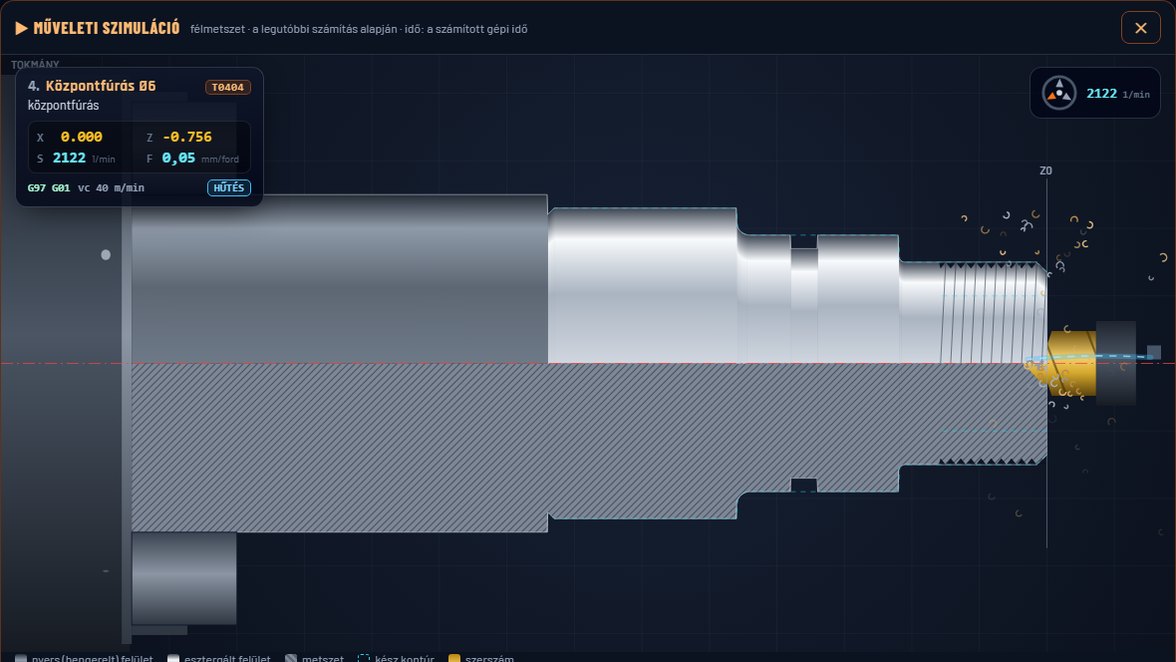
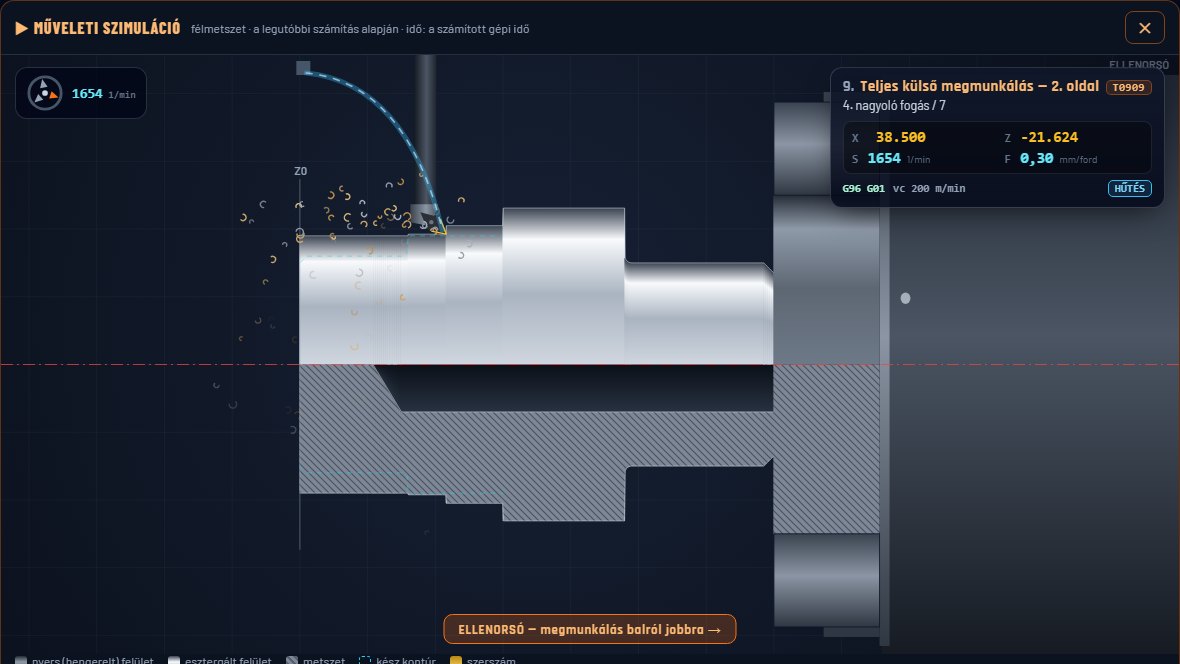
Drehix Studio — műveleti szimulációDrehix Studio — machining simulation
Valódi felvétel a programból — kitalált mintadarabbal.Real capture from the software — with a fictional sample part.Teljes demóvideó →Full demo video →
30 mpsegy átlagos kalkuláció a kontúrtól az áriga typical calculation from contour to price
4,4%átlagos eltérés 21 valós gépi mérésenaverage deviation over 21 real machine tests
25+megmunkálás: esztergálás, hajtott marás és fúrásoperations: turning, live milling and drilling
0 Ftalapverzió — tanulóknak és iskoláknak oktatási licencbase version — education license for learners and schools
Kinek szól?Who is it for?
Egy program — két útOne program — two paths
A műhelynek gyors és pontos ajánlat kell, a tanulónak az, hogy értse, miből lesz az idő és az ár. A Drehix Studio mindkettőt tudja.A workshop needs fast, accurate quotes; a learner needs to understand where time and price come from. Drehix Studio does both.
Műhelyeknek, vállalkozóknakFor workshops and contractors
Ajánlat percek helyett másodpercek alattQuotes in seconds, not minutes
Műveletenkénti forgácsolási idő, gépbeállítás darabra vetítve, sorozatPer-operation cutting time, setup spread per piece, batches
PDF-árajánlat céges fejléccel, ügyféladattal, ajánlatszámmalPDF quote with company header, customer data and quote number
STEP-import a 3D modellből (Pro), kosár több alkatrészhezSTEP import from the 3D model (Pro), cart for several parts
A saját gépedhez igazítható mellékidők és óradíjNon-cutting times and hourly rate tuned to your own machine
Nézd meg, mielőtt a gép elindulSee it before the machine starts
A számítás műveleteit a program lejátssza, mint egy CNC-szimulátor: a darab fogásról fogásra alakul, és a számított gépi idő szerint halad.The software plays back the calculated operations like a CNC simulator: the part takes shape pass by pass, following the computed machine time.
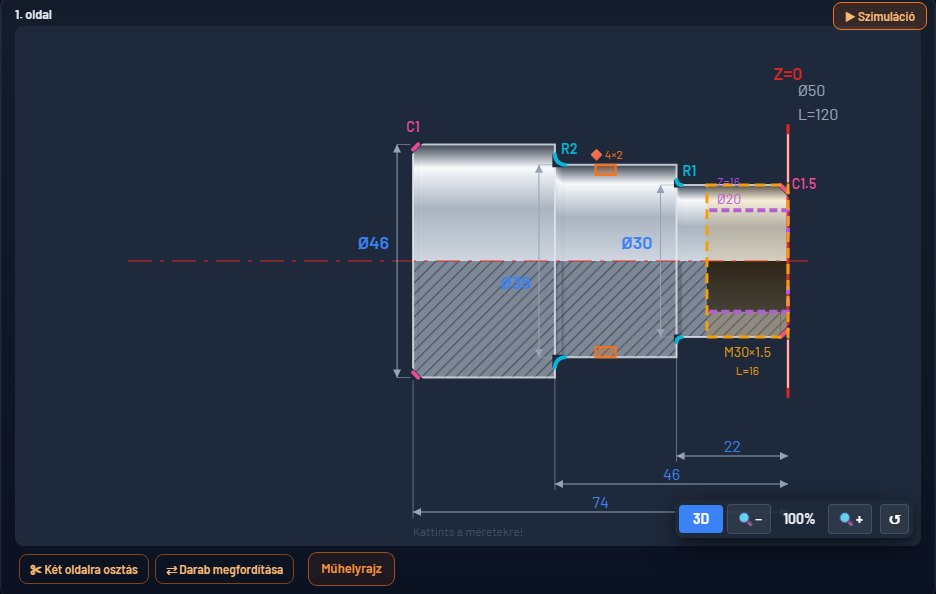
Vállak, kúpok, rádiuszok, letörések, horony, menet és furat — a rajz minden beírásnál frissül. Varázslóval kérdésről kérdésre, vagy a Normál nézetben közvetlenül; STEP-modellből is (Pro).Shoulders, tapers, radii, chamfers, groove, thread and bore — the drawing updates with every entry. Question by question with the wizard, or directly in the Normal view; also from a STEP model (Pro).
Műveletenkénti időPer-operation time
Forgácsolás és mellékidő külön, gépbeállítás darabra vetítve. A „Külső komplett” az oldalazást és a simítást is tartalmazza.Cutting and non-cutting time separately, setup spread per piece. “Ext. complete” includes facing and finishing too.
PDF-árajánlatPDF quote
Céges fejléc, logó, ügyféladat, ajánlatszám, oldalankénti bontás, kis 3D nézet — 3 sablonnal.Company header, logo, customer data, quote number, per-side breakdown, small 3D view — with 3 templates.
STEP-importPRO
A forgástengely, a kontúr, a letörések, a rádiuszok, a furatok és a menetek a 3D modell felületeiből, a hajtott szerszámos elemekkel együtt.Rotation axis, contour, chamfers, radii, bores and threads from the 3D model's faces, with live-tool features too.
FigyelmeztetésekWarnings
Szól, ha hiányzik egy művelet, ha a kontúr nagyobb a nyersnél, vagy ha a furatlista eltér a műveletektől.Flags a missing operation, a contour larger than the blank, or a hole list that differs from the operations.
Visszavonás · 20 lépésUndo · 20 steps
Elírtál egy értéket? Ctrl+Z és már ott is vagy. Ctrl+Y-nal újra.Mistyped a value? Ctrl+Z and it's back. Ctrl+Y to redo.
Tűrés- és menettáblázatTolerance & thread tables
ISO 286-1, metrikus, Whitworth, csőmenet, UNC/UNF — emelkedés, mag- és fúró-Ø.ISO 286-1, metric, Whitworth, pipe, UNC/UNF — pitch, minor and drill Ø.
Kosár és sorozatCart and batches
Több alkatrész egy ajánlatban, darabszám szerint, Ft és EUR összeggel.Several parts in one quote, by quantity, in HUF and EUR.
Android
A gép mellett is: a Google Playről, offline, ugyanazzal a számítással.Right at the machine: from Google Play, offline, with the same calculation.
Saját géphez szabvaTuned to your machine
Gyorsjárat, szerszámcsere, befogás, óradíj — az ajánlat a te gépeddel számol.Rapid rate, tool change, clamping, hourly rate — quotes use your own machine.
Újdonság · WindowsNew · Windows
Hajtott szerszám és műhelyrajzLive tooling and workshop drawing
Már nem csak esztergálásra: a C- és Y-tengelyes műveletek is bekerülnek az időbe, a 3D modellbe, a szimulációba és a rajzra.Not just turning any more: C- and Y-axis operations go into the time, the 3D model, the simulation and the drawing.
Marás és fúrás a darabonMilling and drilling on the part
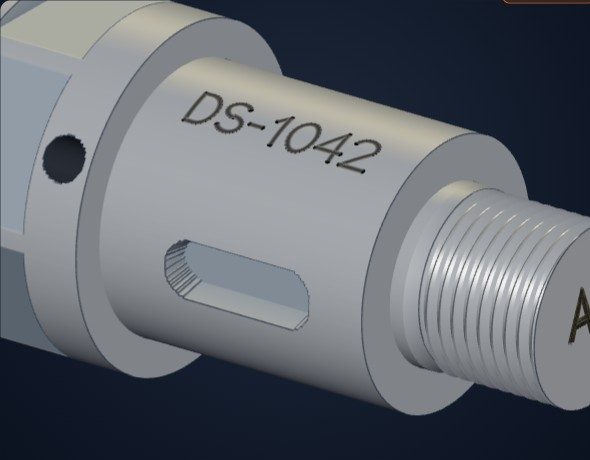
Hatlap és lapolás, horony és zseb, kontúr- és körmarás, fúrás, menetfúrás, dörzsárazás, süllyesztés, gravírozás: homlokon és paláston. Nagyolás és simítás külön, a szerszám mérete és a saját géped adatai szerint. A beállításokban kapcsolható be.Hexagons and flats, slots and pockets, contour and circular milling, drilling, tapping, reaming, countersinking, engraving: on the face and the circumference. Roughing and finishing separately, based on the tool size and your own machine data. Enabled in the settings.
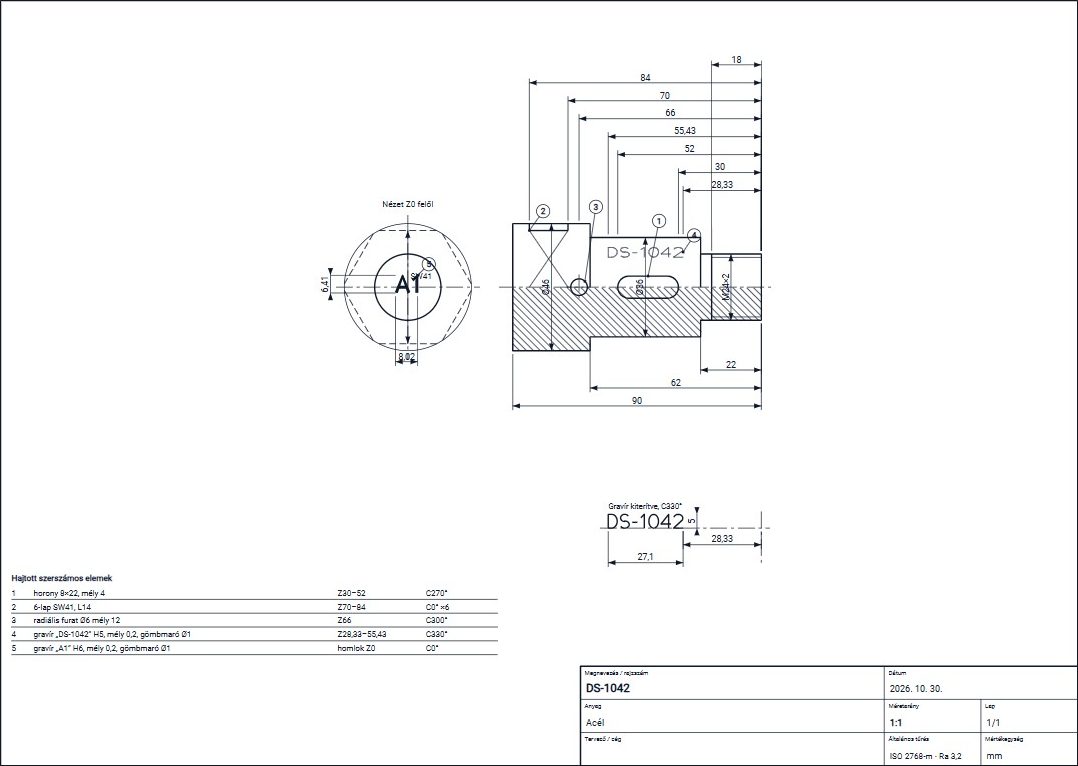
A kontúrból és a műveletekből kész rajz, elölnézettel, metszettel, menetjelöléssel és elemtáblázattal, PDF-ben és SVG-ben. A méretek húzhatók és átírhatók, így tűrést is adhatsz hozzájuk, ami hiányzik, azt kattintással felveszed.A ready drawing from the contour and the operations, with front view, section, thread marking and feature table, as PDF and SVG. Dimensions can be dragged and edited, so you can add tolerances too, and anything missing is one click away.
Forgatható 3D nézetRotatable 3D view
Párhuzamos vetítéssel, mint a CAD-ekben: a műveletek és a menet a modellen látszanak.Parallel projection, as in CAD: operations and threads appear on the model.
Többet olvas a STEP-bőlMore from the STEP filePRO
Felismeri a homlok- és keresztfuratokat, a hatlapot, a lapolást, a hornyot, a menetet és a furatszáj letörését.Recognises face and cross holes, hexagons, flats, slots, threads and bore-mouth chamfers.
Hornyolás fogásról fogásraGrooving pass by pass
A szimuláció a nagyoló beszúrásokat és a két oldalfal simítását is mutatja.The simulation shows the roughing plunges and the finishing of both walls.
Szerszám és művelet együttTool and operation together
Szól, ha hiányzik a magfurat vagy az előfúrás, vagy ha a maró nem fér be a sarokba.Warns about a missing core hole or pre-drill, or a cutter that does not fit a corner.
Két oldalra osztásSplit into two sides
A kontúrt és a műveleteket egy mozdulattal bontod 1. és 2. befogásra, oldalanként külön szimulációval.Split the contour and operations into set-ups 1 and 2 in one move, with a separate simulation per side.
Az oktatásban isIn education too
A hajtott műveletek is kapnak „Miért ennyi?” magyarázatot, a fogalomtárba pedig új fogalmak kerültek, a rajzolvasást is beleértve.Live-tool operations get a “Why this much?” explanation too, and the glossary has new terms, including drawing reading.
Újdonság · WindowsNew · Windows
Ellenorsó, szegnyereg és pontosabb marásSub-spindle, tailstock and more accurate milling
Úgy számol és úgy mutatja a megmunkálást, ahogy a te gépeden történik: bekapcsolható géptudással, fogásról fogásra.It calculates and shows the machining as it happens on your machine: switchable machine features, pass by pass.
Két oldal egy futásbanTwo sides in one run
Ellenorsós gépen a 2. oldal kézi átfogás nélkül készül. A darabidőbe bekerül a saját átvételi időd, a szimuláció lépésenként mutatja az átvételt, utána a 2. oldalt tükörképben, balról jobbra, fordított késekkel. Munkánként visszaállítható kézi átfogásra, és ahol nincs ellenorsó, ott ki is kapcsolható.On a machine with a sub-spindle, side 2 is made without manual re-clamping. Your own transfer time goes into the part time, and the simulation shows the transfer step by step, then side 2 mirrored, left to right, with opposite-hand tools. It can be set back to manual re-clamping per job, and switched off if there is no sub-spindle.
SzegnyeregTailstock
A gépbeállításnál bekapcsolva darabszám × másodperc adódik a beállítási időhöz. Szól, ha hiányzik a központfúrás, vagy furat akadályozza a csúcsot.Switched on in the machine setup, quantity × seconds is added to the setup time. It warns about a missing centre hole or a bore in the way of the centre.
Fogásmélység és oldalfogásDepth of cut and stepover
Marásnál külön adod meg az ap és az ae értékét: 10 hosszú lap 5-ös oldalfogással két sáv.For milling, ap and ae are set separately: a 10 long flat with a 5 stepover is two strips.
Nagyoló és simítóRoughing and finishing
A simítás ugyanazzal vagy külön maróval megy, saját vágósebességgel és lassabb előtolással. Külön kérhető csak nagyolás vagy csak simítás is.Finishing runs with the same or a separate cutter, with its own cutting speed and slower feed. Roughing only or finishing only can also be chosen.
Bővebb szerszámtárLarger tool library
Minden maró-átmérőhöz nagyoló és simító, radiális és axiális megmunkáláshoz, kiinduló értékekkel, amelyeket a saját gépedhez igazítasz.Roughing and finishing for every cutter diameter, for radial and axial machining, with starting values you adjust to your own machine.
Fogásról fogásraPass by pass
A szimuláció műveletenként ugyanannyi fogást mutat, mint a számítás, a menet minden fogását és a forgácstörést is. A marásnál a sávokat is követi.The simulation shows as many passes per operation as the calculation, including every thread pass and chip breaking. In milling it follows the strips too.
Darab megfordításaFlip the part
Egy kattintással a másik homlokról indul a megmunkálás: a kontúr és a műveletek helye is átszámolódik. A kétoldali darab 2. oldalát a program kitölti, és mindig látszik, melyik oldalt szerkeszted.One click starts machining from the other face: the contour and operation positions are recalculated. The program fills in side 2 of a two-sided part, and it always shows which side you are editing.
Oktatási licenc · ingyenes · 1 évEducation license · free · 1 year
Tanulj CNC-esztergálást — ingyenLearn CNC turning — for free
Az oktatási nézet nem a program kezelését tanítja, hanem a szakmát: minden számítás után megmutatja, hogyan jött ki az idő és az ár — tankönyvi felépítésben, a beírt adatokkal.The education view doesn't teach the software — it teaches the trade: after every calculation it shows how time and price were derived, textbook-style, with the numbers you entered.
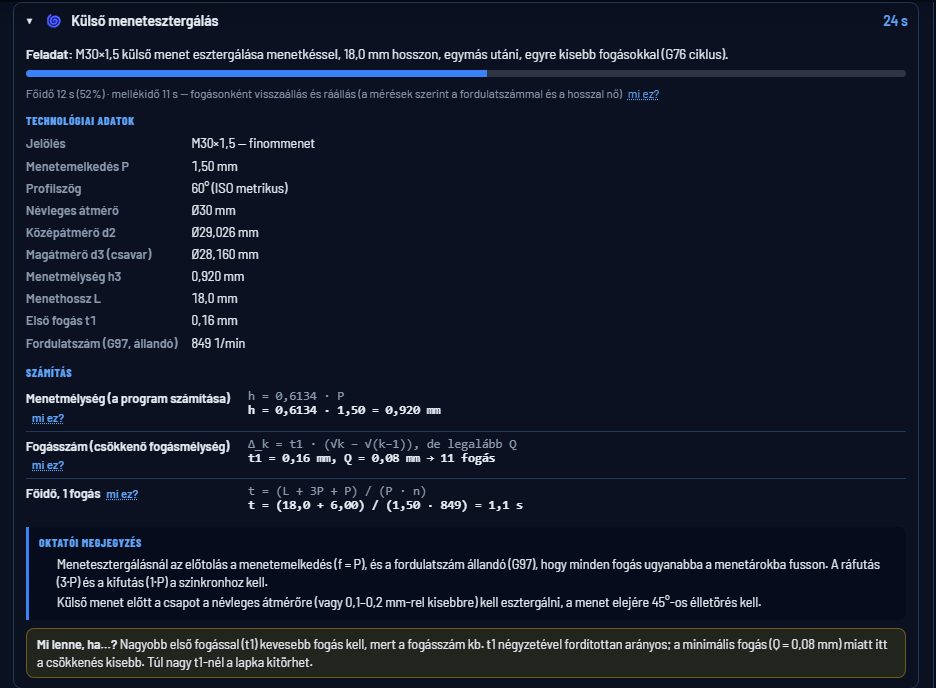
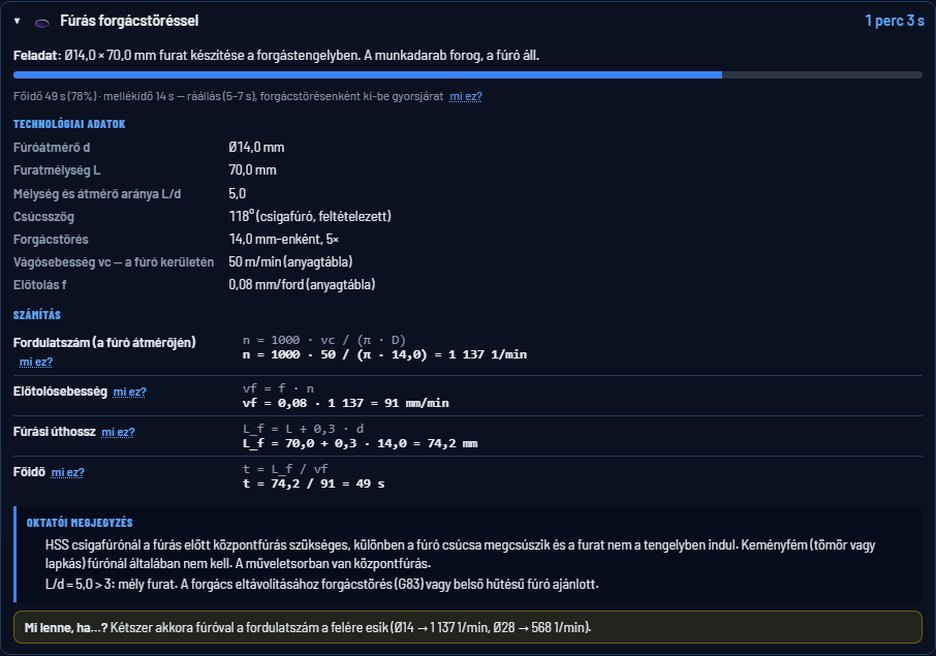
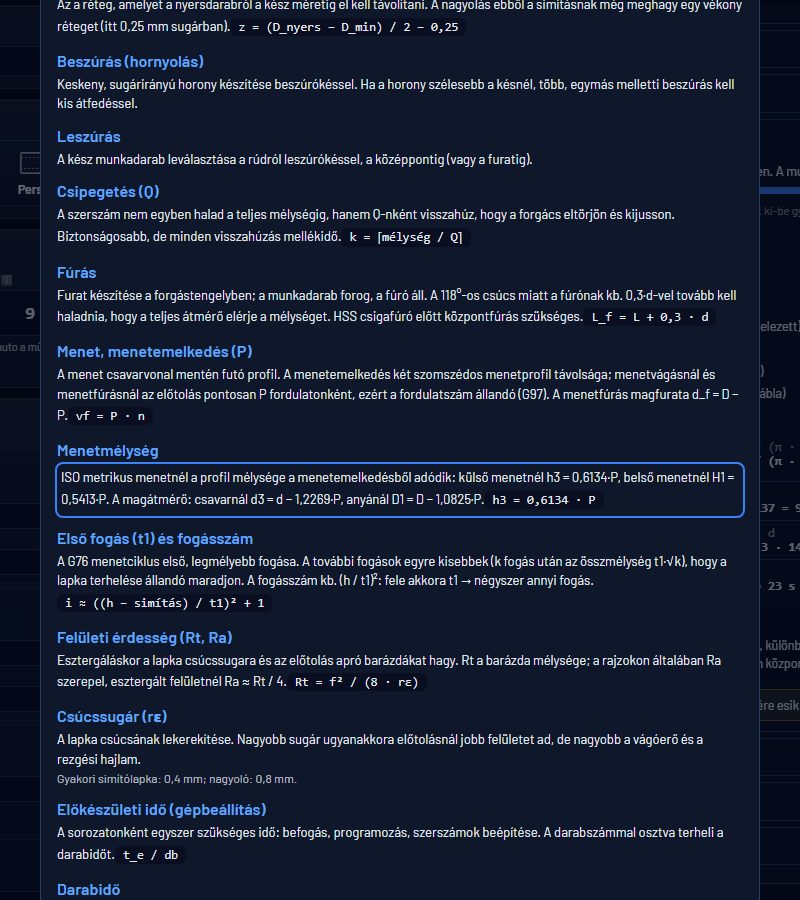
Menetesztergálás: jelölés, emelkedés, középátmérő, magátmérő, menetmélység — és a képletek behelyettesítveThread turning: designation, pitch, pitch and minor diameter, thread depth — with the formulas filled inOktatói megjegyzés: „HSS csigafúrónál előbb központfúrás kell”Instructor note: “centre-drill before an HSS twist drill”Fogalomtár: vc, ap, főidő és mellékidő, G96…Glossary: vc, ap, cutting and non-cutting time, G96…
IskoláknakFor schools
A tanár igényli, az osztály használjaRequested by the teacher, used by the class
Szakképző iskola, technikum, szakképző centrum — OM azonosítóvalVocational schools — with the official school ID (OM)
A megadott gépszámig, egy kóddal minden gépenUp to the stated number of computers, one code for all
A diákokról semmilyen adatot nem kezelünkNo data at all is processed about students
IgénylésRequestKb. két perces űrlap az oktatási oldalon.A two-minute form on the education page.
JóváhagyásApprovalEgyenként átnézzük, és e-mailben küldjük a kódot.We review each request and email you the code.
AktiválásActivationA Windows-programban: Licenc & Logó → Oktatási licenc.In the Windows program: License & Logo → Education license.
Az oktatási licenc a Windows-programban aktiválható. Oktatási célra szól: a PDF-ajánlatokon „OKTATÁSI CÉLÚ PÉLDÁNY” vízjel van, a kosár nem érhető el — kereskedelmi használatra a PRO licenc való. Az oktatási nézet magyar nyelvű.The education license is activated in the Windows program. It is for educational use: PDF quotes carry an “EDUCATIONAL COPY” watermark and the cart is not available — commercial use requires a PRO license. The education view is in Hungarian.
PontosságAccuracy
Valós gépen mérveMeasured on a real machine
Az időmodellt valós CNC-esztergán mért adatokkal kalibráltuk: 21 mérésen átlagosan 4,4% volt az eltérés a gép órájától.The time model was calibrated on a real CNC lathe: across 21 measurements the average deviation from the machine clock was 4.4%.
±5,4%nagyolás · 6 mérésroughing · 6 tests
±4,5%simítás · 6 mérésfinishing · 6 tests
±1,0%hornyolás · 3 mérésgrooving · 3 tests
±5,1%menetvágás · 6 mérésthreading · 6 tests
2026. októberi géppróba (C45, 1.4301, alumínium). Más gépen a mellékidők eltérhetnek — ezek a gépbeállításoknál igazíthatók.October 2026 machine test (C45, 1.4301, aluminium). Non-cutting times may differ on other machines — tune them in the settings.
DemóvideóDemo video
Egy perc alatt végigThe whole flow in a minute
A 2D rajztól a szimuláción és az oktató nézeten át a PDF-árajánlatig.From the 2D drawing through the simulation and the education view to the PDF quote.
DrehixStudio-demo.mp4
CsomagokPlans
Kezdd ingyenStart for free
Az alapprogram időkorlát nélkül ingyenes, napi 5 számítással. Licenc-ajánlatért írj: info@drehixstudio.huThe base software is free with no time limit, 5 calculations per day. For license offers: info@drehixstudio.hu
Free
AlapBasic
0 Ft · örökre· forever
Napi 5 számítás5 calculations per day
25+ megmunkálás, hajtott szerszám, rajz, szimuláció25+ operations, live tooling, drawing, simulation
Regisztráció nélkül. Telepítsd, indítsd el, és perceken belül kész az első kalkulációd.No registration. Install, launch, and your first calculation is ready within minutes.
Windows 10 / 11
Asztali programDesktop app
Telepítős verzió, offline működik. Az oktatási licenc itt aktiválható.Installer, works offline. The education license is activated here.
Windows: ha a SmartScreen figyelmeztetWindows: if SmartScreen warns you
A telepítő digitális aláírása folyamatban van, ezért a Windows „Ismeretlen kiadó” figyelmeztetést mutathat — ez csak azt jelenti, hogy az alkalmazás új.
A letöltött telepítőn jobb gomb → Tulajdonságok → „Letiltás feloldása” → OK.
Ha mégis megjelenik: „További információ” → „Futtatás mindenképp” → a rendszergazdai kérdésnél „Igen”.
Először használod? Használati útmutató · Béta-tesztelő lennél? Jelentkezés · A szoftvert saját felelősségére telepíti és használja; részletek az ÁSZF-ben.First time? User guide · Want to be a beta tester? Apply · You install and use the software at your own risk; see the Terms.
KérdésekQuestions
Gyakran kérdezikFrequently asked
Tényleg ingyenesen tanulhatok vele?Can I really learn with it for free?
Igen. Az oktatási licenc egy évre ingyenes iskoláknak és egyéni tanulóknak is — az oktatási oldalon igényelhető, egyenként jóváhagyjuk. Az alapprogram (napi 5 számítás) igénylés nélkül is ingyenes.Yes. The education license is free for one year for schools and individual learners — request it on the education page; each request is approved individually. The base software (5 calculations a day) is free without any request.
Miben jobb ez az Excelnél?Why is this better than Excel?
Ismeri az anyagok vágóadatait, a menetvágás és a G96 állandó vágósebesség szerinti időt, rajzot és szimulációt mutat, és PDF-árajánlatot készít — CNC-esztergálásra tervezve, nem általános táblázatként.It knows material cutting data, thread and G96 constant-surface-speed timing, shows a drawing and a simulation, and produces PDF quotes — designed for CNC turning, not a generic spreadsheet.
Mennyire pontos az idő?How accurate is the time?
Valós CNC-esztergán 21 mérésen átlagosan 4,4% volt az eltérés. Más gépen a mellékidők eltérhetnek, ezeket a gépbeállításoknál a saját gépedhez igazíthatod. A végső ajánlatot mindig te hagyod jóvá.On a real CNC lathe the average deviation over 21 measurements was 4.4%. Non-cutting times may differ on other machines; tune them to your own machine. You always approve the final quote.
A hajtott szerszámos idők is ennyire pontosak?Are live-tool times just as accurate?
Még nem. A 4,4% az esztergálási műveletekre vonatkozik. A marási, hajtott fúrási és gravírozási idők becslések, ezeket valós gépen még nem mértük be, ezért ellenőrizd őket a saját gépeden.Not yet. The 4.4% applies to turning operations. Milling, live drilling and engraving times are estimates that have not yet been measured on a real machine, so check them on your own.
Androidon is megvan a hajtott szerszám és a műhelyrajz?Are live tooling and the workshop drawing on Android too?
Egyelőre nem, ezek a Windows-verzióban érhetők el.Not yet, they are available in the Windows version.
Hogyan kapok Standard vagy Pro licencet?How do I get a Standard or Pro license?
Írj az info@drehixstudio.hu címre; az aktiváló kulcsot e-mailben kapod, általában egy munkanapon belül. Egy licenc 1 Windows + 1 Android eszközre szól.Email info@drehixstudio.hu; you receive the activation key by email, usually within one business day. One license covers 1 Windows + 1 Android device.
Kell folyamatos internet?Is a constant internet connection required?
Nem, offline is működik. A licenc ellenőrzéséhez legalább 30 naponta egyszer internettel kell elindítani; ha ez elmarad, a program ingyenes módba vált, és a licenc a következő online indításkor visszaáll.No, it works offline. To verify the license, start it with internet at least once every 30 days; otherwise it switches to free mode and the license is restored at the next online start.
Mi történik a licenc lejárta után?What happens when the license expires?
A program ingyenes módba vált: az alapfunkciók megmaradnak, csak a licenchez kötöttek (korlátlan számítás, STEP-import, műhelyrajz) zárolódnak.The program switches to free mode: basic features remain; only licensed ones (unlimited calculations, STEP import, workshop drawing) are locked.
Kiváltja a varázsló a Normál nézetet?Does the wizard replace the Normal view?
Nem, kiegészíti: kérdésről kérdésre felveszi a kontúrt, majd a Normál nézetbe tölti, ahol látod, módosítod és számolsz. A számítás mindkét úton ugyanaz.No, it complements it: it captures the contour question by question, then loads it into the Normal view where you see, adjust and calculate. The calculation is the same either way.
VáltozásnaplóChangelog
Mi újult megWhat's new
v2.35.178 – 1832026. 11. 08.
Pontosabb STEP-felismerés, excentrikus furat, valósághű marási időkMore accurate STEP recognition, eccentric holes, realistic milling times
STEP: reteszhorony lekerekített fenékkel és több horony egy darabon; osztókörös furatok egy műveletben, lekerekített furatvéggel is átmenőként; menetes csavar kontúrral, hatlappal és UNC/UNF menettel; fogaskerék egy kontúrmarással; homlokhorony homlok-hornyolásként, a túlsó homlokon a 2. oldalra
Excentrikus homlokfurat: látszik a 3D-ben (a túlsó homlokon is), választható fúrás, körmarás vagy előfúrás + körmarás
Műhelyrajz: teljes metszet (A–A) excentrikus furatnál excentricitás-mérettel; részletnézet a sűrű vállakhoz; a 2. oldali furat mélysége a túlsó homloktól; menetfelirat a névleges méretre
Szimuláció: a hajtott fúrás fúróként látszik; a körmarás kívülről, csavarvonalban halad befelé, a számolt körszámmal
Marás: keményfém szármaró katalógusadatok (pl. acélban Vc 100 m/perc), egy sávban marja, ami befér – a hatlapok, lapolások ideje valósághű
Normál nézet: a két oldal rajza görgetés nélkül elfér, az eredmények a Számítás gomb alatt
Két oldalra bontás: a vágásnál lévő váll tőrádiusza és letörése nem fordul meg
STEP: keyways with rounded bottom and several keyways on one part; bolt-circle holes as one operation, through holes even with rounded ends; threaded screws with contour, hexagon and UNC/UNF thread; gears as one contour milling; face grooves as face grooving, the far-side one on side 2
Eccentric face hole: shown in 3D (on the far face too), choose drilling, circular milling or pre-drill + circular milling
Workshop drawing: full section (A–A) with eccentricity dimension for eccentric holes; detail view for closely spaced shoulders; side 2 hole depth from the far face; thread labels with nominal size
Simulation: live-tool drilling shown as a drill; circular milling ramps in helically from outside with the calculated number of turns
Milling: solid carbide end mill catalogue data (e.g. Vc 100 m/min in steel), one strip where it fits – realistic hexagon and flat milling times
Normal view: both sides fit without scrolling, results below the Calculate button
Split into two sides: the root radius and chamfer at the cut shoulder no longer flip
v2.35.174 – 1772026. 11. 05.
Hajtott szerszámos elemek a STEP-ből, kétoldali megmunkálásLive-tool features from STEP, two-sided machining
STEP: a darab végén kiálló mart csapból kontúrmarás lesz; felismeri a kúpos süllyesztést és a darab túloldaláról készülő hengeres süllyesztést
Két oldalra osztás: a 2. oldal mindig kap esztergálást, a homlokhoz kötött furatok és marások a homlokukkal együtt kerülnek a jó oldalra
Műhelyrajz: a 2. oldali furatok és süllyesztések is rajta vannak; a méretvonalak nem futnak át a furatokon, a központfúrás nem zavarja a méretezést
Szimuláció: valósághű szármaró a kiválasztott átmérővel, kontúrmarás a pálya mentén körbe, az anyag fokozatosan fogy
Menetfúró-méretű furatnál (pl. Ø6,8) a program rákérdez, menetes-e
3D: a homlokon mart csap pontosan látszik
Varázsló: „Vissza a varázslóba” gomb – a betöltött alkatrész az utolsó lépésen javítható
A varázslóban megadott menet- és menetfúrás-kezdő Z átkerül a műveletbe és a modellre
Androidon a választott magyar nyelv megmarad, és az egész program magyar lesz
STEP: a milled pin at the part end becomes a contour milling operation; countersinks and counterbores from the far side are recognised
Split into two sides: side 2 always gets turning, face-bound holes and milling move to the right side with their face
Workshop drawing: side 2 holes and countersinks are shown; dimension lines avoid holes, centre drilling no longer disturbs dimensioning
Simulation: realistic end mill with the selected diameter, contour milling along its path, material removed step by step
For tap-drill sized holes (e.g. Ø6.8) the program asks whether they are threaded
3D: a pin milled on the face is shown accurately
Wizard: “Back to wizard” button – fix a loaded part at the last step
The thread and tapping start Z entered in the wizard is passed to the operation and the model
On Android the selected language is kept and applied to the whole program
v2.35.170 – 1732026. 11. 05.
Új anyagválasztó, szabványos műhelyrajzNew material picker, standard workshop drawing
Új anyagválasztó: kategóriák ISO-színnel, keresés DIN-, W.-Nr.- és AISI-jelölésre, legutóbb használt anyagok, forgácsolhatósági sáv
Műhelyrajz a szabvány szerint: félmetszet rejtett vonalak nélkül, belső átmérők fél méretvonallal, kúp félszöggel, vetítési jel a szövegmezőben
Szimuláció: homlok-nézet külön sávban, jól látható belső kés és menetfogak, rádiuszos horony
STEP: a beszúrás pontos szélessége és helye; a kúpba futó keskeny szakasz már nem számít beszúrásnak
Sima fúrás a varázslóban csipegetés nélkül; hajtott menetfúrás magfurattal; CSV-export a kosárból
Biztonsági átvizsgálás: szigorúbb ablak- és hívásvédelem a programban
New material picker: categories with ISO colours, search by DIN, W.-Nr. and AISI designation, recently used materials, machinability bar
Standard-compliant workshop drawing: half section without hidden lines, internal diameters with half dimension lines, taper half-angle, projection symbol in the title block
Simulation: end view in its own panel, clearer boring bar and thread teeth, radius grooves
STEP: exact groove width and position; a narrow section running into a taper is no longer taken for a groove
Plain drilling in the wizard without pecking; live-tool tapping with core drill; CSV export from the cart
Security review: stricter window and call protection in the application
 DREHIX STUDIO